Light Manager — UI List Component
The UI List is the visual representation of the scene's lighting hierarchy inside Scene Light Manager. It provides a dense, information-rich view of every light and emitter object in your scene.
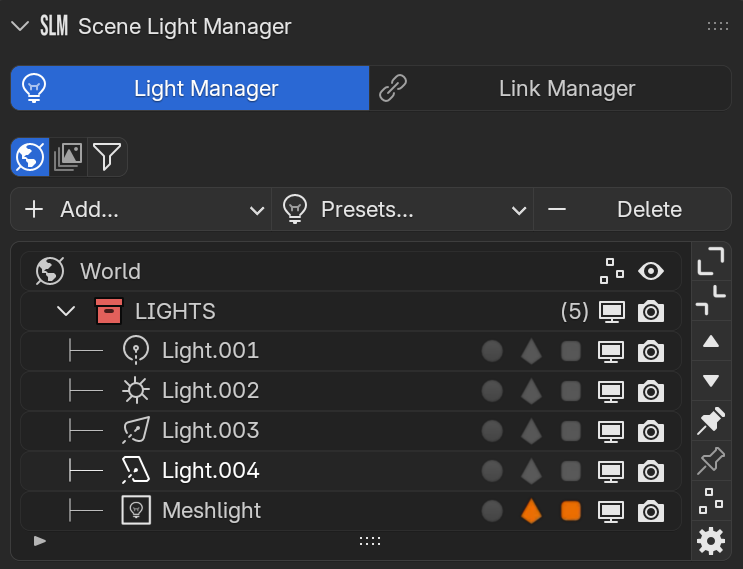
1. The Main UI List Structure
The central list displays your scene structure, divided into three main types of rows: **World Rows**, **Collection Header Rows**, and **Light Object Rows**.
 A. World Row
Appears at the very top of the list (can be hidden in options) and represents the active environment shading:
World Label Displays the active world background shader block currently driving the environment ambient color.
 Mute World
 Toggles the world background shader on/off. When muted, it isolates scene lights against pure black. Lights up red when muted.
 Isolate World
 Isolates the world lighting contribution, temporarily disabling all other scene lights to inspect environment-only conditions.
 B. Collection Header Rows
Represent rig folders or scene collections, featuring collapse triggers and bulk override locks:
 Navigation & Control
 -
 Collapse / Expand: Toggles children visibility in the list hierarchy.
-
 Select Target: Selects the rig's tracking target empty object.
-
 Select Controller: Selects the rig's main transform controller empty.
 Inherited Overrides
 -
 Light Group Lock: Parent-level Light Group override.
-
 Light Linking Lock: Parent-level Light Linking override.
-
 Shadow Linking Lock: Parent-level Shadow Linking override.
-
 Exposure Override: Active parent-level Exposure override.
Status Indicators - Isolate: Lights up if this collection is currently soloed.
-
 Pin: Lights up if the collection visibility is pinned.
- Count Children Count: Shows the number of lights inside, e.g.
(3).
Visibility Toggles -
 Selectability: Toggle viewport selectability.
- Viewport: Toggle standard viewport visibility.
-
 Render: Toggle final render visibility (F12).
- Driver Lock: Active if properties are driven by animations.
 C. Light Object Rows
Represent individual light sources, meshes, or helpers:
Emitter Type Icons  Point Light
  Sun Light
  Spot Light
  Area Light
  Bouncer
  Blocker
  Mesh Light
  Mesh Emitter
  Empty HDRI Sphere
  Relationship Assignment
 Clicking opens a quick popup menu to assign the light to a group/linking:
- Light Group (LG): Cycles compositor routing.
- Light Linking (LL): Receive objects.
- Shadow Linking (SL): Cast shadows overrides.
Status & Isolation - Isolate: Indicates if this specific light is currently soloed in the viewport.
Visibility Controls - Selectability: Toggle viewport selectability.
- Viewport Eye: Toggle viewport visibility.
- Render Camera: Toggle render visibility.
2. Inline Expanded Details Sub-Row
[NOTE] Expanded Sub-Row Interface: If a light is selected (and "Auto Expand" is enabled) or if "Expand All Details" is enabled, an indented sub-row
└─opens displaying properties directly within the list:
For Lights Provides inline adjustment parameters:
- Target Pointer: Direct target assignment.
- Power Slider: Edits
energyvalue in Watts. - Color Picker: Edits
colorvalue.
For Controllers/Empties Provides empty viewport display properties:
- Display Type: Plain Axes, Arrows, Sphere, Cube, etc.
- Display Size: Viewport size scale.